


ID Card Printing Made Easy: Finding a Printer That Meets Your Organisation’s Needs
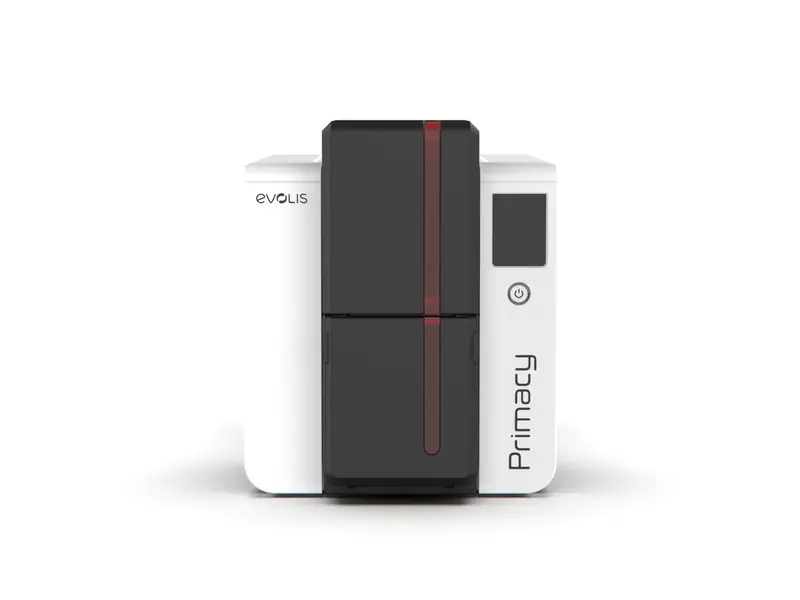
Producing identification cards internally can give an organisation more control over its day-to-day administration. New employee joins the team? A replacement card is needed? A member's details change? Having suitable printing equipment can make these tasks easier to manage.
The challenge is finding equipment that fits the organisation rather than purchasing a printer based purely on specifications. An id card printer should be considered as part of a complete card-production process involving design, data, blank cards, ribbons and staff workflow.
Begin With the People Using the System
The person responsible for printing cards may not be an IT specialist. They might work in HR, administration, reception or office management.
That makes simplicity an important consideration.
Map the Current Process
Before looking at equipment, write down how a card is currently created.
For example:
-
Employee information is collected
-
A photograph is prepared
-
Card details are entered into a template
-
The card is checked
-
The design is printed
-
The finished card is issued
Once this process is clear, you can identify where a printer needs to fit.
How Many Cards Will You Produce?
Printing volume is one of the most practical questions to answer.
A small organisation may only produce a few cards every month. A larger organisation may regularly issue new badges, replace lost cards and update existing identification.
Consider Your Future Needs
It is useful to think beyond today's numbers. Staff growth, new departments, temporary workers or membership changes can increase demand.
An id badge printer should be capable of handling the workload you realistically expect without making everyday operation unnecessarily difficult.
Busy Periods Deserve Attention
Some organisations have predictable peaks. A company may hire several people at once, while a school or club may issue cards during a particular season.
If your printer will face occasional periods of heavier demand, include those periods in your planning.
Card Design Should Guide Your Choice
Think about the finished card before thinking about the printer.
Will you print:
-
A photograph?
-
A logo?
-
A barcode?
-
A QR code?
-
Employee information?
-
Dates?
-
Information on both sides?
The answers can help identify useful printer capabilities.
Keep the Layout Practical
A professional card does not need to be overloaded with information. Clear hierarchy makes it easier to identify the cardholder quickly.
The person's name and photograph might receive priority, while secondary information can be positioned elsewhere.
Good design also helps prevent tiny text or crowded graphics that become difficult to read after printing.
Printing on One Side or Both?
This decision can affect the equipment you select.
If the organisation always keeps identification information on the front, single-sided printing may be adequate. If the reverse side contains additional information, dual-sided capability may be worth considering.
Before selecting an id card printer machine, look at your current cards and ask whether the layout is likely to change in the future.
Quality Matters for Identification
A card is often viewed at close range, so blurry text, poor photographs or inconsistent colour can make it look less professional.
Check the Important Visual Elements
Pay particular attention to:
-
Face photographs
-
Small text
-
Fine lines
-
Logos
-
Barcodes
-
Background graphics
If barcodes or QR codes are part of the card, the printed result should also be tested with the intended scanning equipment.
Don't Ignore the Software
The printer itself is only one component. Card-design software can determine how easy it is to create, edit and reproduce cards.
A useful system should make common tasks straightforward.
Templates Can Save Time
If every employee card follows the same format, using a standard template can reduce repetitive design work. Staff can update the person's information and photograph while keeping the overall appearance consistent.
This can also help maintain a uniform visual identity across cards.
Keep Replacement Cards in Mind
Lost or damaged cards are a normal administrative issue for many organisations. A replacement process should therefore be simple.
If the organisation keeps employee information securely and has a reusable card template, producing a replacement can be much quicker than designing a new card from scratch.
Establish a Clear Replacement Procedure
A simple process might include:
-
Confirming the person's identity
-
Deactivating the previous card where applicable
-
Checking the stored details
-
Producing the replacement
-
Recording the new card information
The exact process depends on the organisation's systems and security procedures.
Consider Printing Costs Over Time
The purchase price can attract most attention, but recurring expenses also matter.
An id card printer may require:
-
Blank cards
-
Colour or monochrome ribbons
-
Cleaning supplies
-
Replacement components
-
Protective overlays where applicable
Estimate how often these consumables will be needed. This gives you a more realistic picture of ongoing costs.
When Security Features Become Relevant
Not every ID card requires advanced security. However, organisations using cards for access control or other sensitive purposes may have additional requirements.
Depending on the printer and card system, features such as magnetic stripes, smart-card encoding, holographic elements or other security measures may be available.
These should be selected according to the organisation's actual security process rather than added simply because they are available.
Why Choose Us
Organisations benefit from a card-printing provider that looks at the complete requirement rather than focusing on a single specification. A practical approach considers print volume, card design, software, consumables and the experience of the people who will operate the equipment.
Clear communication can also make technical choices easier to understand. Customers should be able to compare options based on genuine workplace needs and select equipment that fits their intended workflow.
About Us
Our approach is centred on making identification-card printing more manageable for organisations. We understand that different workplaces have different card formats, production volumes and administrative processes.
Rather than assuming that one printer fits every application, we encourage customers to examine their actual requirements first. This creates a more practical foundation for selecting equipment and planning an efficient card-production process.
Make ID Card Production Simpler
The right printer can turn a time-consuming administrative task into a repeatable process. But the equipment should support the organisation's workflow rather than dictate it.
Consider the cards you need, the people who will print them, the number required and the features that genuinely matter. Once those factors are clear, finding an id card printer machine becomes much easier—and the final decision is more likely to support your organisation for the long term.

 English
 Arabic
 French
 Spanish
 Portuguese
 Deutsch
 Turkish
 Dutch
Dutch
 Italiano
 Romaian
 Portuguese (Brazil)
 Greek
Greek