


Smart Lock Installation Service: How to Upgrade Your Door Security and Enjoy Keyless Access
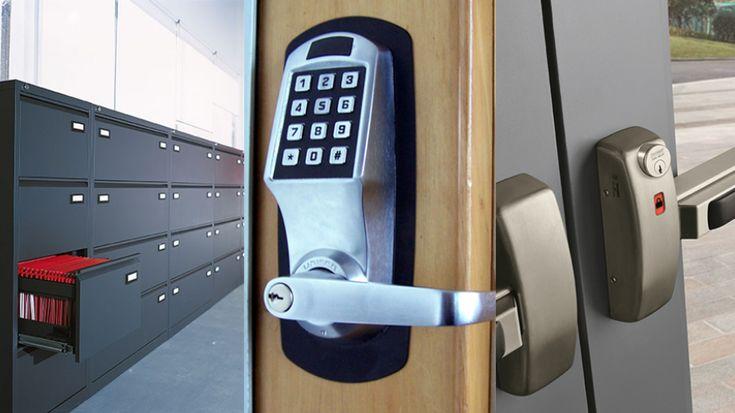
Have you ever left home and wondered whether you remembered to lock the door? Traditional keys can be inconvenient, especially when several family members or employees need access to the same property. A smart lock installation service can help address these everyday challenges by introducing keyless entry and more flexible access control. However, choosing a smart lock involves more than selecting a modern design. Understanding how these devices work, their security features, compatibility, and maintenance requirements can help you make the right decision.
1. What Is a Smart Door Lock and How Does It Work?
A smart lock is an electronic locking device that allows users to secure and access a door without relying entirely on traditional keys. Depending on the model, it may use different authentication methods.
Common access options include:
-
PIN codes: Enter a personal code using a digital keypad.
-
Fingerprint recognition: Unlock the door using registered fingerprints.
-
Mobile applications: Control the lock through a compatible smartphone.
-
Access cards: Use a programmed card or key fob.
-
Bluetooth connectivity: Unlock the door when an authorized device is nearby.
-
Wi-Fi connectivity: Manage supported lock functions remotely through an internet connection.
Some models combine several access methods, giving homeowners flexibility when choosing how to enter their properties.
2. Important Benefits of Installing a Smart Lock
Smart locks offer practical features that can make everyday property access easier.
Convenient Keyless Entry
One major advantage is reduced dependence on physical keys. Family members can use authorized PIN codes, fingerprints, or mobile devices to access the property.
Better Access Management
Some smart locks allow owners to create temporary access codes for guests, cleaners, or maintenance workers. These codes can often be removed or scheduled to expire, depending on the device.
Activity Notifications
Connected models may send notifications when someone locks or unlocks the door. Certain devices also maintain an activity history, helping users understand how access is being managed.
Remote Control
Wi-Fi-enabled smart locks may allow users to check lock status and control certain functions remotely. This feature depends on the model, network connection, and manufacturer's application.
Although these features improve convenience, they do not automatically make every smart lock more secure than a traditional lock.
3. What to Check Before Choosing a Smart Lock
Not every electronic lock is compatible with every door. Checking a few important details before purchasing can prevent installation difficulties.
Door compatibility: Check the door material, thickness, existing lock configuration, and available installation space.
Authentication options: Choose a device that supports convenient access methods for everyone who will use it.
Battery performance: Review expected battery life and whether the lock provides low-battery warnings.
Emergency access: Check whether the device includes a backup key, external power option, or another emergency entry method.
Security features: Look for encryption, secure authentication, automatic locking options, and manufacturer-supported software updates.
Environmental suitability: Consider heat, humidity, and dust exposure when selecting a lock for an entrance exposed to outdoor conditions.
Reading the manufacturer's specifications is particularly important before purchasing a device for a glass, aluminium, or unusually designed door.
4. Understanding the Smart Lock Installation Process
Correct installation is essential because an electronic lock must work with both the door and its locking mechanism.
A typical installation involves several steps:
-
Inspect the door: Check its dimensions, existing hardware, alignment, and overall condition.
-
Confirm compatibility: Compare the door measurements with the smart lock's installation requirements.
-
Prepare the mounting area: Remove existing hardware if necessary and prepare the required fixing points.
-
Install the device: Fit the exterior and interior components according to the manufacturer's instructions.
-
Configure access: Set administrator credentials, fingerprints, PIN codes, and application connectivity where supported.
-
Test operation: Check locking, unlocking, emergency access, and automatic locking functions.
After installation, test the lock several times while the door is open before relying on it for everyday use.
For additional locksmith-related information, you can visit Key Lock Dubai and contact the provider to confirm which smart lock options and installation services are available.
5. Smart Lock Maintenance and Common Mistakes to Avoid
Electronic locking systems require occasional maintenance to remain reliable.
Follow these simple practices:
-
Replace batteries when the device gives a low-power warning.
-
Keep the keypad and fingerprint sensor clean.
-
Use strong administrator passwords.
-
Avoid sharing permanent access codes unnecessarily.
-
Install firmware updates from the manufacturer's official application.
-
Remove access permissions for people who no longer need entry.
-
Test backup access methods periodically.
-
Keep a secure record of the manufacturer's instructions.
One common mistake is ignoring battery warnings. A smart lock may stop operating electronically when its power supply becomes depleted, so understanding its emergency access procedure is essential.
Frequently Asked Questions
Are smart locks suitable for residential properties?
Yes. Many smart locks are designed for residential entrances, but compatibility depends on the door structure and the device's specifications.
Can a smart lock work without Wi-Fi?
Many models support PIN codes, fingerprints, or Bluetooth without requiring continuous Wi-Fi access. However, remote management generally requires an internet connection.
What happens if the smart lock battery dies?
The solution depends on the model. Some devices support an emergency power connection, backup keys, or other alternative entry methods.
Are smart locks safe from hacking?
No electronic device is completely risk-free. Choosing a reputable manufacturer, using strong credentials, updating software, and securing connected accounts can reduce potential risks.
Can I install a smart lock on an existing door?
In many cases, yes. However, the door dimensions, existing lock mechanism, and manufacturer's compatibility requirements must be checked first.
Final Thoughts
Smart locks offer a convenient alternative to traditional key-based entry, with features that can simplify access management and improve everyday usability. However, selecting the right device requires attention to compatibility, electronic security, battery performance, and emergency access. Proper installation and regular maintenance are equally important. By understanding these factors before upgrading, property owners can choose a locking system that suits their needs while maintaining dependable door security.

 English
 Arabic
 French
 Spanish
 Portuguese
 Deutsch
 Turkish
 Dutch
 Italiano
 Russian
 Romaian
 Portuguese (Brazil)