


How Sensors Help Robots Understand Their Surroundings
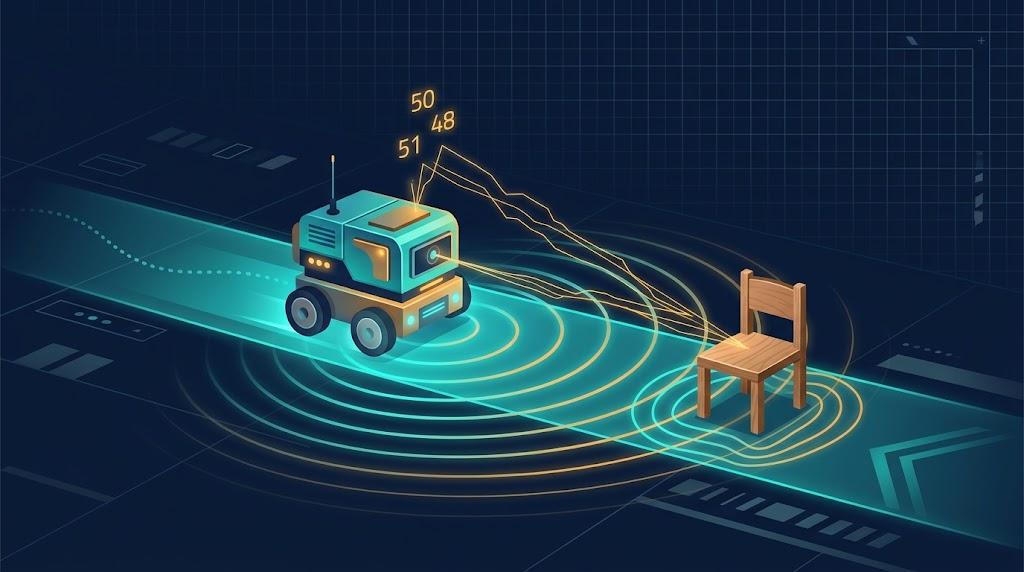
A small robot rolls across a university lab floor. Someone has left a chair in its path. The robot slows, stops, and the chair survives.
It looks simple. It isn’t. The robot had to detect the chair, estimate the distance, pass that number to a controller and receive a movement command, all within a fraction of a second. If any link failed, the chair would have had a bad day.
That is what I like about sensors. A sensor gives a robot information, not understanding. The real engineering sits in what happens next.
What a Sensor Actually Does
A sensor turns a physical condition, such as distance, light or motion, into an electrical signal a controller can read. That is the whole job. It has no idea what a chair is.
Most lab robots combine several. An ultrasonic sensor handles distance, a camera adds visual detail and an IMU (accelerometer plus gyroscope) tracks movement. Each covers a gap the others leave.
Some sensors look outward and some look inward. Obstacle sensors tell the robot about the world; encoders, gyroscopes and accelerometers tell it about itself. Reliable navigation needs both.
Why Readings Wobble
Picture an ultrasonic sensor facing a wall. It reports 50 cm, then 48, then 51. The wall has not moved.
Vibration, motor noise, surface texture and mounting position all nudge the result. That is normal, not necessarily a fault.
There is another complication that is easy to overlook: temperature changes the speed of sound.
The distance formula is d = (v × t) / 2, where v is the speed of sound and t is the round-trip time. Plenty of beginner code hardcodes 343 m/s, which is right at about 20°C.
Sound speeds up by roughly 0.6 m/s per degree. In a workshop at 30°C, the true speed is nearer 349.5 m/s, so the hardcoded value underestimates distance by about 1.8%. At 50 cm, that is roughly 9 mm of consistent error.
Angles cause trouble too. A pulse hitting an angled surface can bounce away from the receiver. The echo is weak or missing, and the robot may decide nothing is there.
Cameras have their own problems: poor light, shadows and half-hidden objects. And detecting an object is not the same as recognising it. A distance sensor can report something 20 cm away. It cannot say whether that is a person or a box.
The Main Sensor Technologies
If you are searching for Robotics Coursework Help UK, start with a habit that markers reward: explain why a sensor suits the task, not just what it does.
Ultrasonic: sends sound pulses and times the echo. Cheap and simple, but soft surfaces absorb sound and angled ones deflect it.
Infrared: reflected-intensity types suit short-range detection, but surface colour and ambient light can shift the reading. Time-of-flight versions cope better, though strong sunlight can still interfere.
Camera: rich information, heavy processing. It needs decent lighting and software that can interpret what it sees.
LiDAR: laser pulses that build a map of the surroundings. Excellent for navigation, but costlier and more demanding on processing.
Choosing a Sensor for the Job
A sensor that suits a small robotic arm may be a poor choice for a robot in a busy corridor. The equipment is not worse. The job is different.
Accuracy and resolution are not the same. Accuracy is how close a reading is to the true value. Resolution is the smallest change the sensor can show. A device can show tiny changes and still be consistently wrong.
Then comes response time, and a quick calculation helps. Say your robot travels at 0.5 m/s. The control loop runs every 100 ms and the ultrasonic ping takes about 30 ms to return.
In that time it covers roughly 6.5 cm before it even reacts. Braking adds more. Your stopping threshold must include reaction distance, not just braking distance.
Noise needs balance. One odd reading could trigger an unnecessary stop. Filter too hard, though, and you might miss a real hazard.
When Sensors Disagree
Say the ultrasonic sensor reports an obstacle at 30 cm, but the camera sees nothing there. Which one wins?
Neither, automatically. The controller has to weigh reliability, timing, position and operating conditions. The camera frame may be 100 ms old. The two sensors may cover slightly different areas. Dim light weakens the camera, while an angled or soft surface can fool the ultrasonic unit.
A cautious design might slow down and re-measure rather than ignore either reading. For further reading, look into weighted averaging and Kalman filters, the standard tools for sensor fusion.
A Worked Obstacle-Avoidance Example
Take a two-wheeled robot with a front ultrasonic sensor. It sends a pulse, times the echo and calculates distance. The minimum allowed distance is 25 cm. At 18 cm, the controller stops the motors.
The collision is avoided, but the problem remains. Restarting would drive it straight back at the same object. A better programme reverses slightly, turns, then measures the new direction before moving. The earlier reading no longer describes what is ahead.
Now the detail most people overlook: chattering. If the robot stops at 25 cm and restarts the moment the reading creeps to 25.1 cm, it will stutter back and forth. Use hysteresis. Stop below 25 cm, but only resume once the path reads above 30 cm.
For a practical assignment, test it properly:
- Log true distance, sensor reading and error in three columns
- Repeat on soft, hard and angled surfaces
- Record missing or inconsistent readings
- Note the temperature during each run
- Compare raw readings with a median filter
A median filter takes several readings and uses the middle value, ignoring one-off spikes. The cost is delay: five samples at 30 ms each means 150 ms before a decision.
Mistakes That Cost Marks
Treating detection and recognition as the same thing. Distance is not identity.
Mixing up accuracy and precision. A sensor that always reads 42 cm when the true distance is 45 cm is precise, not accurate.
Skipping the processing stage. Between sensor and motor sits the logic that evaluates, compares and decides.
Listing only advantages. Say where each sensor fails, too.
Bringing It Together
Back to the chair. The robot stopped safely because a measurement was collected, checked, interpreted and turned into a command, in time.
So question every stage. What did the sensor detect? How reliable is it? What could distort it? Is there time to respond?
A robot does not need perfect information. It needs a design that knows the limits of its measurements and has a plan for when they let it down.

 English
 Arabic
 French
 Spanish
 Portuguese
 Deutsch
 Turkish
 Italiano
 Russian
 Romaian
 Portuguese (Brazil)
 Greek